HM Studio Nesting

Practical nesting software for CNC production.

BPP Production BetaCAD $79/month+ applicable taxes

Add parts, replace parts, re-nest quickly, and keep production moving with compatible CNC files your cabinet or furniture shop already trusts.

BiesseWorks BPP Production Beta is available now. Compatibility is confirmed before the 14-day production trial begins.

Based in TorontoRemote onboarding, technical support, and separately quoted on-site services are available.
25+ years production experienceBPP Production BetaProduction-first verification
CNC router cutting the HM Studio name into a thick wood panel with visible wood chips

CURRENT PRODUCT

BiesseWorks BPP

AvailableProduction Beta

The currently supported HM Studio Nesting workflow for compatible BPP programs.

Request BPP Access

Honing ideas.

Musing possibilities.

Building practical solutions.

THE THINKING BEHIND HM

Production ideas shaped into practical tools for the shop floor.

HM Studio Nesting

From trusted part programs
to a verified sheet.

Import compatible CNC programs, set the sheet and production rules, add or replace parts, arrange and inspect the layout, then generate nesting output for final machine-side verification. BiesseWorks BPP is the currently available Production Beta workflow; MPR and bSolid support are still in development.

WHAT MAKES HM NESTING DIFFERENT

Control the relationships
ordinary nesting misses.

Built for real cabinet parts—not just rectangles on a sheet. Keep assemblies synchronized, preserve exact part relationships, use interior cutouts, and make fast layout adjustments without losing control.

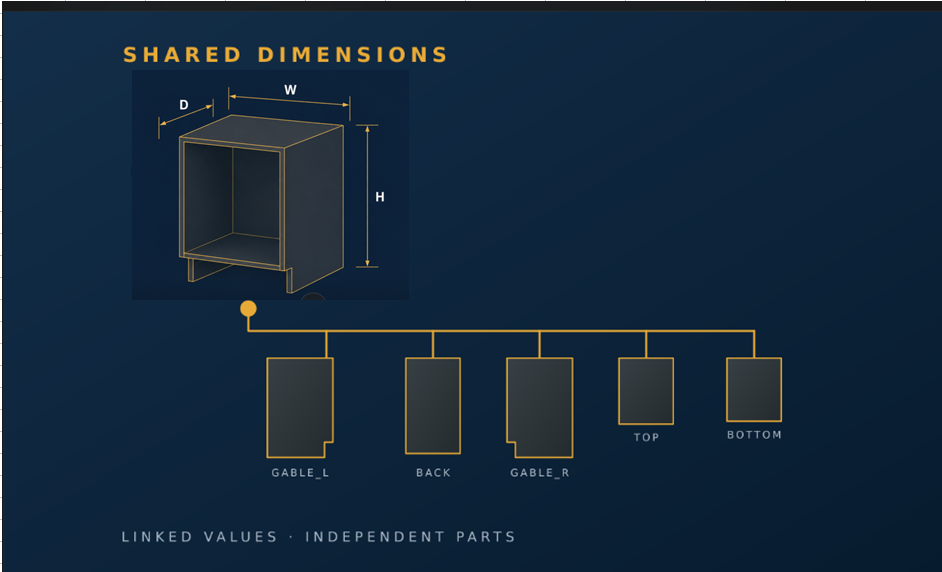
Linked Assembly cabinet with shared width, height, and depth dimensions connected to five production panels
01 · LINKED ASSEMBLY

Change the cabinet once. Update every part.

Import a compatible BiesseWorks BPP multi-part parametric program as a linked assembly, then update shared dimensions while each part remains independently nestable.

  • One shared parameter set
  • Individual grain and production settings
  • Fewer missed or mismatched changes
Learn more
  • One shared parameter set
  • Individual grain and production settings
  • Fewer missed or mismatched changes
Pin Group diagramAn L-shaped part and a rectangular filler part are pinned together, then rotate exactly 90 degrees as one group while keeping exactly the same relative position.PIN THE RELATIONSHIPROTATE 90°PINNED TOGETHERROTATE 90° AS ONE · RELATIVE POSITION STAYS FIXED
02 · PIN GROUP

Build the exact relationship, then lock it.

Position parts precisely, then preserve their relative coordinates as one fixed group through the next layout update.

  • 90° group rotation for a better panel fit
  • Fixed group boundary during repacking
  • Relative positions stay unchanged
Learn more
  • 90° group rotation for a better panel fit
  • Fixed group boundary during repacking
  • Relative positions stay unchanged
Glass Door to Part-in-Part NestingThe centre cutout of a glass door is normally removed during machining. Part-in-Part places another usable part inside that same waste area.USE THE CENTER CUTOUTGLASS DOORCENTER REMOVEDPART-IN-PARTNEST IN WASTE AREARECOVER MATERIAL THAT WOULD OTHERWISE BE WASTED
03 · PART-IN-PART NESTING

Turn the glass-door cutout into usable sheet area.

Nest compatible parts inside otherwise wasted internal areas to improve material utilization.

  • Ideal for glass-door center cutouts
  • Place compatible parts inside the waste area
  • Recover material that would otherwise be discarded
Learn more
  • Ideal for glass-door center cutouts
  • Place compatible parts inside the waste area
  • Recover material that would otherwise be discarded
OPERATOR CONTROLS

Fast to position.
Easy to verify.

Precise everyday controls support the larger workflow without adding unnecessary steps. Numeric fields accept simple expressions, so values can be adjusted directly without calculating elsewhere.

01Corner OriginSwitch instantly between top-left, bottom-left, bottom-right, and top-right working origins.
02SnapMoveReposition parts around sheet defects or fine-tune a layout. Enter an expression such as X + 10.5 directly in the coordinate field while snapping helps prevent interference.
03Library PeekPreview library programs before adding them to the nesting job.
04ClashGuardHighlight interference in red so the operator can review it before proceeding.
05Linked SelectionSelect a sheet part to highlight its job-list entry; distinct colours make parts easier to identify.
06MultiMoveTemporarily select and move several independent parts together—without creating or preserving a permanent group relationship.
01Corner OriginSwitch working origins instantly.

Switch instantly between top-left, bottom-left, bottom-right, and top-right working origins.

02SnapMoveMake fast, exact incremental moves.

Reposition parts around sheet defects or fine-tune a layout. Enter an expression such as X + 10.5 directly in the coordinate field while snapping helps prevent interference.

03Library PeekPreview programs before adding them.

Preview library programs before adding them to the nesting job.

04ClashGuardSee interference before proceeding.

Highlight interference in red so the operator can review it before proceeding.

05Linked SelectionMatch sheet parts to job-list entries.

Select a sheet part to highlight its job-list entry; distinct colours make parts easier to identify.

06MultiMoveMove independent parts together temporarily.

Temporarily select and move several independent parts together—without creating or preserving a permanent group relationship.

ONE PRODUCT · MONTHLY SUBSCRIPTION

HM STUDIO NESTING

One practical product.
Workflow support expands over time.

HM Studio Nesting supports compatible CNC cabinet and furniture manufacturing workflows. Software updates and technical support are included while the subscription is active.

CAD$79/ month+ applicable taxes

COMPATIBILITY-FIRST ONBOARDING

Prove the workflow on your machine before you subscribe.

We first confirm that HM Studio Nesting can produce valid output from programs your shop already trusts, then give your team time to judge the workflow in real production.

01Send proven programsProvide several mature BPP programs that are already used successfully in your shop.
02Receive test nesting outputHM Studio uses the matching edition to generate nesting programs for your current workflow.
03Run and reportYour shop reviews and tests the output. If an error appears, send the message and relevant setup details for adjustment.
04Refine until compatibleThe test is repeated as needed until the agreed sample workflow is confirmed—or the evaluation ends with no charge.
05Use it free for 14 daysAfter compatibility is confirmed, use HM Studio Nesting for 14 days. Subscribe only if it meets your needs; otherwise, simply stop.
What compatibility approval means

Approval confirms the tested sample workflow and machine setup. It does not replace the shop’s final review of future jobs. Operators remain responsible for checking every generated program, machine settings, tooling, workholding, and safe machining conditions before production. HM Studio will correct and update confirmed software defects within the supported edition.

AVAILABLE · PRODUCTION BETA

BiesseWorks BPP

The currently supported HM Studio Nesting workflow for compatible BPP programs.

INCLUDED IN HM STUDIO NESTINGRequest BPP Access
COMING SOON

woodWOP MPR

MPR workflow support is being prepared and verified for a future release.

PLANNED PRODUCT CAPABILITY
IN DEVELOPMENT

bSolid

bSolid workflow support remains under development and is not currently available.

PLANNED PRODUCT CAPABILITY

Online subscriptions are opening shortly.

HM STUDIO NESTING

Simple monthly pricing.

CAD$79/ month+ applicable taxes
  • Software updates included
  • Technical support included
  • BPP Production Beta

COMPATIBILITY CHECK · 14-DAY TRIAL

Test your workflow first.

01Send proven BPP programsUse programs already trusted in your shop.
02We verify compatibilityHM Studio prepares and checks matching output.
03Start your 14-day trialEvaluate the approved workflow in production.
How compatibility testing works
  1. Send proven BPP programs.
  2. Receive test nesting output.
  3. Run and report results.
  4. Refine until the sample workflow is compatible.
  5. Begin the approved 14-day production trial.

WORKFLOW ROADMAP

Current and planned support.

BPPAvailableProduction Beta
MPRComing Soon
bSolidIn Development

Additional CNC formats

CNC Compatibility Testing

HM STUDIO is currently focused on BPP, MPR, and bSolid-related workflows. Other controller and CNC program formats, including structured or text-based systems, may be evaluated on request.

Compatibility depends on the machine, controller, program structure, machining requirements, and available technical information. Reliable support is confirmed through testing and is not guaranteed in advance.

Request Compatibility Test
  1. 01Send a representative CNC program.
  2. 02Include the corresponding drawing or part information.
  3. 03Include useful screenshots from the machine software.
  4. 04HM STUDIO reviews the program structure and machining requirements.
  5. 05If feasible, HM STUDIO develops a sample adapter or output.
  6. 06Test the sample on your own system.
  7. 07Report errors or differences back to HM STUDIO.
  8. 08Testing continues until compatibility is confirmed or reliable support cannot be achieved.

Built from production

25+ years of production experience,
built into every decision.

Hands-on experience across CNC operation, programming, and cabinet design—including helping three small cabinet shops grow from initial production setup toward mature manufacturing workflows.

25+Years of hands-on production experience
CNC + DesignOperation, programming, and cabinet design
TorontoRemote onboarding and GTA on-site support

Additional shop support

Programming and training,
when your shop needs it.

Nesting is the core product. Custom CNC programming, bSolid training, program review, and file preparation are available as separately quoted services.

01

CNC Program Development

Custom CNC programs for bSolid, BiesseWorks, and woodWOP—prepared around your parts, tooling, and production workflow.

bSolidBiesseWorkswoodWOPParametric programsProduction support
TRAINING

bSolid Training

Practical training built around your operators, programs, tooling, and real production workflow—available remotely or on site in the GTA.

Compatibility check · 14-day trial

Test first. Subscribe with confidence.

Begin with proven BPP programs from your own shop. We will test, adjust, and confirm the agreed workflow before your free 14-day production trial begins.

✓ Online compatibility testing✓ 14 days free after approval✓ No obligation to subscribe

Toronto-area support: Remote onboarding is available, with on-site setup, workflow review, and operator training available in the GTA and nearby areas. Scope and fees are confirmed separately.

No payment is required to evaluate compatibility or begin the approved 14-day trial.

About HM Studio

Built around the way
small shops actually work.

HM Studio develops focused CNC production software and programming support for cabinet and furniture manufacturers. The work is grounded in more than 25 years of hands-on production, programming, and shop-floor problem solving.

HM Studio Nesting is the main software product. BiesseWorks BPP support is available as a Production Beta; additional workflow support will be added only after practical verification.

Production knowledge

Latest Insights

Practical notes on nesting strategy, material use, and CNC production decisions.

View All Insights →

Product questions

Before you request access.

Clear answers about compatibility, pricing, the production trial, and planned workflow support.

Does HM Studio Nesting replace my current CNC software?

No. It works with compatible CNC part programs your shop already trusts. Your existing programming and machine workflow remain the production reference.

Which BPP files are supported?

BiesseWorks BPP is available as a Production Beta. Compatibility is confirmed against proven programs and the machine setup used by your shop; support is not assumed for every BPP file or machine configuration.

Do I need to change my existing programs?

Your proven programs are the starting point. If a specific program or setup needs adjustment, HM Studio will explain that during compatibility testing before a trial begins.

How do compatibility testing and the 14-day trial work?

You provide proven BPP samples, HM Studio prepares matching nesting output, and your shop reviews the result. The 14-day production trial starts only after the agreed sample workflow is confirmed compatible.

What is included in CAD $79 per month?

One HM Studio Nesting subscription includes the available supported workflow, software updates, and technical support while the subscription is active. Applicable taxes are additional.

Can I cancel the subscription monthly?

The product is offered as a monthly subscription. The current cancellation terms are available on the Subscription & Cancellation page before paid subscriptions open.

When will MPR and bSolid be available?

woodWOP MPR is Coming Soon and bSolid is In Development. HM Studio will publish availability only after practical workflow verification; no release date is promised yet.

Support & enquiries

Contact HM Studio.

Ask about HM Studio Nesting, BPP compatibility, onboarding, training, or programming support. We reply by email and may request suitable sample files through a private channel when needed.

Production verification required

Operators must review every generated CNC program, machine setup, tooling, workholding, and machining condition before production.